
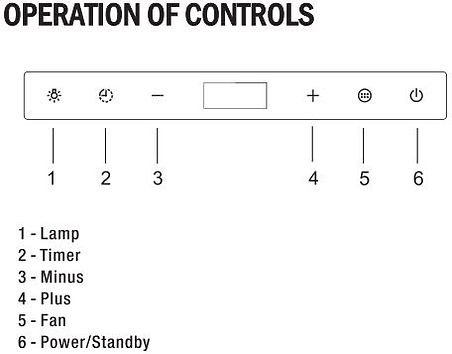
Lamp (Light)
-
Press the Lamp to control the lights
-
The lights can be controlled in Standby Mode and Power Mode
Timer
-
While the range hood is operating
-
Press TIMER to turn on the timer
-
The clock will automatically show 0300 minutes
-
Press Plus (+) or Minus (-) to set the timer in minutes (Up to a maximum of 60:00 minutes)
Set the clock
-
Press the Timer to set the clock.
-
Press the Plus (+) to set hours and press the Minus (-) to set the minutes. After 10 seconds, the clock will be automatically saved and disappear
-
Press the Timer and hold for 3 seconds to display the clock
Fan
-
Press the Fan to turn it on at high speed
-
The fan has 3 speeds
-
F1 for low speed
-
F2 for medium speed
-
F3 for high speed
-
Press the PLUS (+) and Minus (-) to adjust the fan speed
-
Press FAN again not turn it off
-